A native desktop companion for SurgMD on macOS and Windows — pulls your synced cases, photos, and revenue into a focused desktop workspace built for the times your phone isn’t enough.
The desktop, alongside your phone
SurgMD lives on your phone — that’s where cases are logged, the moment they finish. SurgMD Desktop is for everything that comes next: reviewing, organising, editing, and preparing your records.
Your cases stay primarily on your phone — the desktop app pulls a copy down on every launch so what you see is always current.
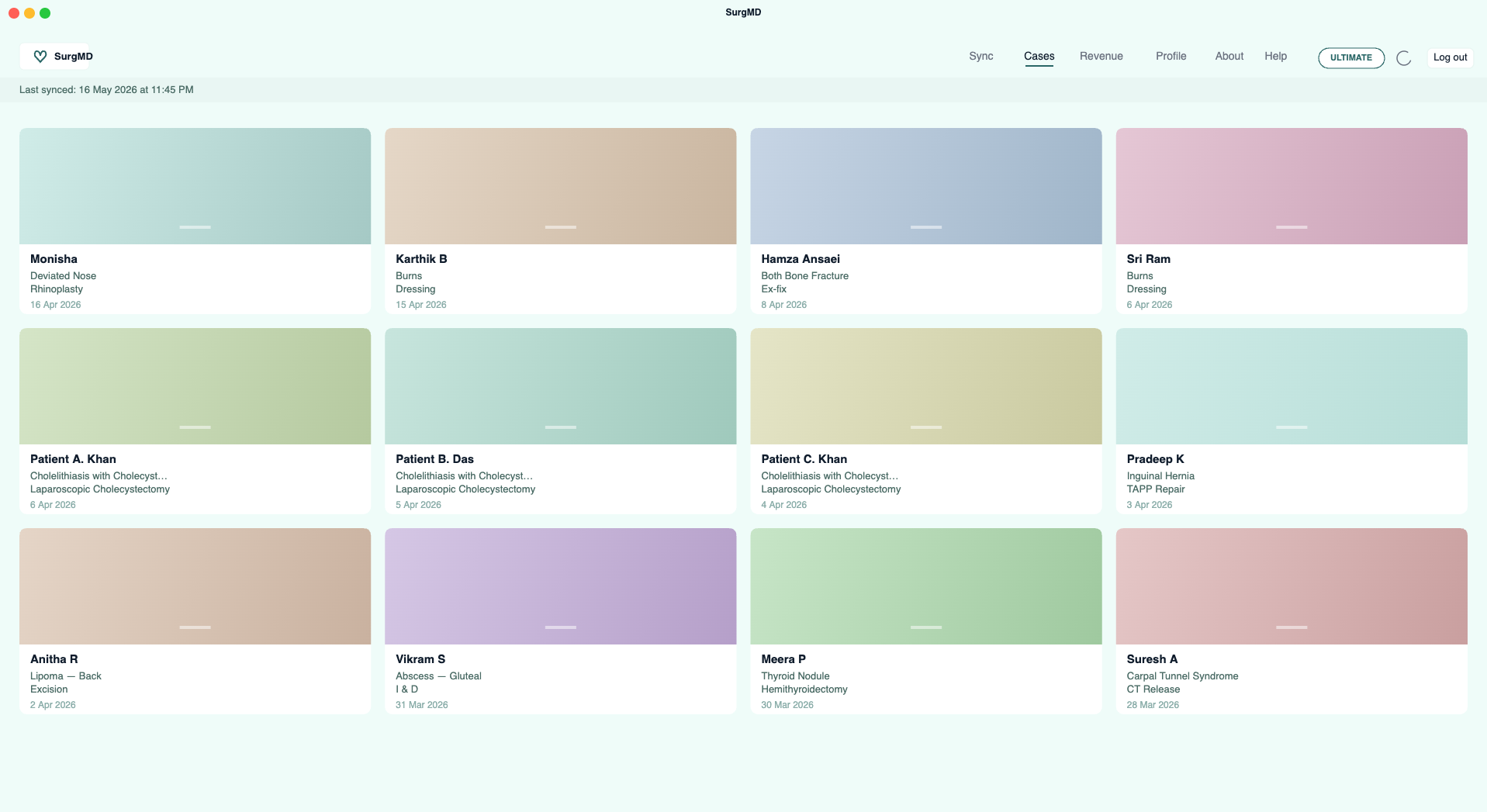
Four-column gallery, full-keyboard search, revenue dashboard, and inline editing — designed around how surgeons actually review their work.
A real desktop app on macOS and Windows — light/dark mode, dock or taskbar badges, and proper file-manager integration. Reveal any case folder on disk with a single click.
What you get, by plan
The desktop app activates on Pro — a full read-only window into everything synced from your phone, on one registered desktop (Mac or Windows). Ultimate adds editing across every field and lets you sync across every machine you sign in on. Patient name is the one exception — it’s an encrypted field and can only be changed on the phone.
The free plan keeps SurgMD on your phone. The desktop app shows a clear upgrade prompt and unlocks the moment you switch to Pro.
Sign-in works on Free, but the gallery, sync, and revenue pages stay locked behind an upgrade prompt. Cases continue to live on your phone — just upgrade when you’re ready to see them on a bigger screen.
Need your records on a computer without upgrading? Sign in to surgmd.chounda.com from any browser, long-press any case card to enter multi-select mode, then choose Export to download the selection.
The full logbook on your desktop — browse, search, tag media, and reveal folders on disk. One Mac or Windows PC per account. Editing case fields requires Ultimate.
Everything in Pro — plus inline editing across every field, media tagging, and the freedom to sync as many Macs as you want.
Side-by-side
A single table for picking the right plan for your desktop workflow.
| Feature | Free | Pro | Ultimate |
|---|---|---|---|
| Desktop access | |||
| Sign in to the desktop app | ✓ | ✓ | ✓ |
| Gallery, sync & revenue pages | Locked | ✓ | ✓ |
| Read your data | – | ✓ | ✓ |
| Edit existing cases | – | Read-only | ✓ |
| Sync & gallery | |||
| Full cloud sync (cases, media, revenue) | – | ✓ | ✓ |
| Auto-sync on launch (>1 hr stale) | – | ✓ | ✓ |
| Phase-by-phase sync progress & status bar | – | ✓ | ✓ |
| 4-column case gallery with cover photos | – | ✓ | ✓ |
| Search across cases | – | ✓ | ✓ |
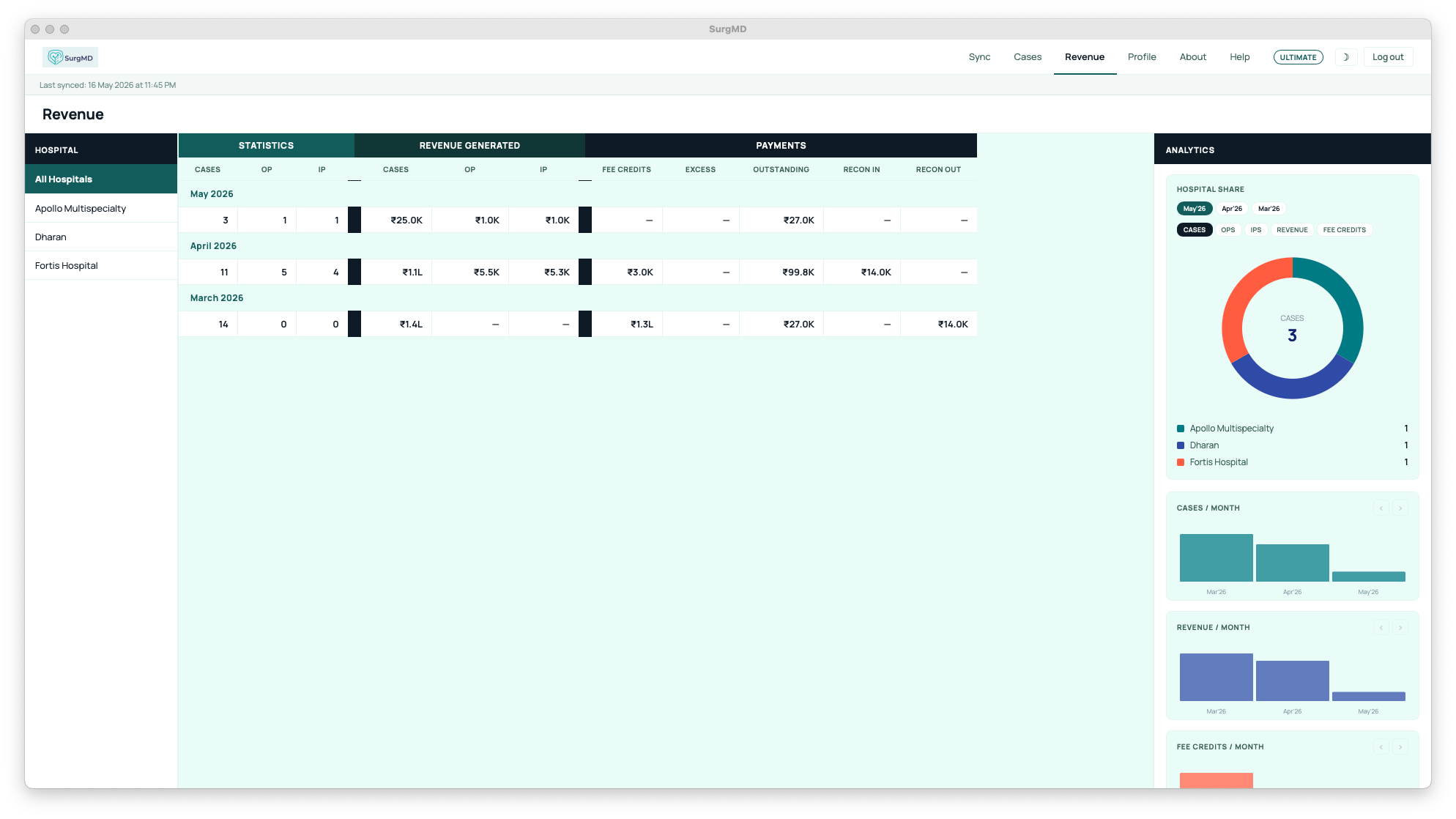
| Revenue dashboard (donut, bar, per-hospital, monthly) | – | ✓ | ✓ |
| Devices | |||
| Registered desktops per account | – | 1 | Unlimited |
| Manage / revoke devices | – | ✓ | ✓ |
| Change local backup folder | – | ✓ | ✓ |
| Editing & advanced (no “Add new case”) | |||
| Inline editing (date, dx, procedure, fee…) | – | – | ✓ |
| Tag photos & videos | – | ✓ | ✓ |
| Reveal case folder in Finder / Explorer | – | ✓ | ✓ |
| Auto-reload case page after background sync | – | ✓ | ✓ |
| Add new cases on desktop | – | – | Phone only |
In the workspace
A quick walk through the parts of SurgMD Desktop you’ll spend the most time in.
Cases · Pro
Every case you’ve logged on the phone shows up here, with a cover photo, a clear reference, and the most-searched fields right under it. No tap-to-expand — everything you need to spot a case sits in the card.
Revenue · Pro
Donut chart for the split across hospitals, monthly bar chart for trend, and an itemised breakdown per institution. Every number is sourced live from your synced data.
Editing · Ultimate
Spot a typo in a diagnosis or want to fill in the fee a week later? Click the field on the desktop, type, and move on — changes sync back to your phone instantly. New cases still start on the phone.
You always own your data
The desktop app is the smoothest way to work, but it’s not your only option. The SurgMD web app at surgmd.chounda.com already lets you bulk-export everything you’ve logged — from any browser, on any computer.
This is true of every SurgMD account. Your records belong to you — not to us, not to your hospital, not to a vendor. You can export them today, tomorrow, or five years from now.
On your machine, under your control
The same encryption and zero-knowledge architecture that protects your phone data carries through to the desktop — with one extra benefit: your work is also on your own disk.
Cases and media stay encrypted from your phone, through transit, all the way into the local backup folder on your desktop.
Every desktop that syncs your account — Mac or Windows — is explicitly registered. Lose one? Revoke it from any other device in seconds.
You choose where the backup lives — iCloud, an external SSD, a Time Machine target. Move it anytime from Profile.
Get the app
SurgMD Desktop is a single downloadable app for macOS and Windows. Sign in with the same account you use on your phone — your data appears the moment sync finishes.
Requires SurgMD Pro or Ultimate. The app installs free, but the gallery, sync, and revenue pages activate the moment you upgrade.
System requirements
SurgMD Desktop activates with Pro — read-only on one Mac or Windows PC. Ultimate unlocks editing across every device you sign in on.